EKS + Cilium = 解放 IP
整理 Cilium 相關名詞、在 EKS 使用 Cilium overlay 模式的運作方式,以及部署過程中遇到的 VXLAN、masquerade、hostNetwork 等問題與解法。
Cilium 懶人包
🧠 BPF / eBPF 是什麼?
BPF(Berkeley Packet Filter) 最早是個抓封包的工具,現在進化成 eBPF,可以在 Linux 核心裡執行小程式,
Cilium 就是靠這個來取代 iptables 和 kube-proxy 的!
🧩 比喻:eBPF 就像是在作業系統內部加裝超快的迷你機器人,不用送封包出去問外部人,就能決定該怎麼處理封包。
🎯 Cilium 用 eBPF 做的事:
- 控制封包能不能通過(取代 iptables)
- 做 Service 轉送(取代 kube-proxy)
- 記錄流量、產生觀察資料(像 DNS、HTTP 日誌)
🔄 SNAT(Source NAT)是什麼?
SNAT 是將封包的來源 IP 地址改成另外一個 IP 的技術,通常是換成節點的 IP,讓對方回覆時知道要回哪裡。
🧩 比喻:就像你打電話去訂餐,不說自己的名字而是說公司總機的號碼,這樣回電時一定找得到。
🎯 用途:
- Pod 出去跟外部通訊時(不管是對外網或 Node 本身),可以確保回應封包會正確回到節點再轉回 Pod
- 在 overlay 模式或 NAT gateway 架構下幾乎必須啟用
📌 在 Cilium 裡怎麼實現?
- Cilium 用 eBPF 實作 SNAT 功能,無需依賴 iptables
- masquerade 就是一種常見的 SNAT 應用場景
🧙 masquerade(IP 偽裝)是什麼?
masquerade 是一種 SNAT(Source NAT)的做法,會把 Pod 封包的來源 IP 替換成節點 IP,再送出主機。
🧩 比喻:就像一群 Pod 偷偷出去上網時,不想讓外部看到自己真面目,就戴上 Node 的假面具出門(所以外面只看到節點 IP)。
🎯 在 Cilium 裡的用途:
- 當 Pod 要連到 Node 上的服務(例如 CoreDNS)時,如果沒有 masquerade,有些環境(特別是 overlay 模式)會因為 routing 回來找不到原 IP 而造成連線失敗。
- 啟用 masquerade 可以保證封包回來時找得到路。
📌 常見問題:
- 你提到的「CoreDNS 無法解析」通常是因為封包沒 masquerade,回來時找不到對應,導致 UDP 封包直接丟掉。
🔀 iptables 是什麼?為什麼被 Cilium 取代?
iptables 是傳統的 Linux 防火牆與 NAT 工具,Kubernetes 很多功能(像 Service、NetworkPolicy)都靠它實作。
🧩 比喻:iptables 就像一條長長的檢查哨,每個封包都要排隊走完整段才知道能不能通過。慢、難 debug、很佔資源。
🎯 Cilium 用 eBPF 取代 iptables,好處有:
- 速度快(查表 vs. 排隊)
- 程式更簡潔、可觀察
- 直接在 Kernel 處理,不需頻繁切換上下文
🧰 kube-proxy 是什麼?為什麼 Cilium 要取代它?
kube-proxy 負責把 Service 的 IP(ClusterIP)轉送到後面的 Pod 上,
傳統上是靠 iptables/ipvs 寫很多 NAT 規則。
🧩 比喻:kube-proxy 就像一個站在門口的人,幫忙指路:「你要找這個服務?它在後面這間房,請走這邊。」
🎯 Cilium 取代 kube-proxy 有這些好處:
- 不用寫一堆 iptables 規則(更快)
- 支援更進階的 Load Balancing 演算法(像 Maglev)
- 和 NetworkPolicy 可以整合處理,架構更簡單
- 內建觀察工具(像 Hubble),封包去哪裡一目了然!
🔌 cilium-envoy 是什麼?
cilium-envoy 是 Cilium 內建整合的 Envoy Proxy 實例,主要用來處理 L7 層的流量控制。
🧩 比喻:如果 eBPF 是幫你管「這包封不封」,那 cilium-envoy 就像是會說話的智慧保全:「你只能看這個網址,這段內容不能給你看喔~」
🎯 用途:
- 處理 HTTP 層的細節(例如只允許 GET /health)
- 執行 L7 NetworkPolicy 的實作邏輯
- 協助產生可觀察資訊(如 HTTP tracing, metrics)
cilium-envoy 通常不是每個封包都會經過,只有當你用到 L7 Policy 或 Ingress Gateway 時才會啟用。
🛡️ CiliumClusterwideNetworkPolicy(CCNP)是什麼?
CCNP 是 Cilium 提供的 cluster-scope 網路策略,可以跨 namespace 寫防火牆規則。
🧩 比喻:Kubernetes 的 NetworkPolicy 是在每間辦公室貼門禁卡,CCNP 是在整棟大樓裝一套中央門禁系統,控管全部流量。
🎯 用途:
- 管控跨 namespace 的連線行為
- 支援 L7 等級(如:只能 GET /health)
🌐 BGP 是什麼?
BGP(Border Gateway Protocol) 是一種網路之間「互相報路線」的協定。
🧩 比喻:每個 Node 就像一個人住的社區,BGP 就是大家告訴外面的人:「我這裡有某些 Pod,要來的話從這條路進來!」
🎯 在 Cilium 裡的用途:
- 當你不走 VXLAN,而是用 direct routing 模式時,Cilium 會透過 BGP 把 Pod 的 IP 範圍公告出去,讓實體網路設備知道怎麼走。
🎁 總結:誰是誰?
| 名稱 | 是什麼 | 在 Cilium 裡幹嘛 |
|---|---|---|
| eBPF | Linux 核心內程式平台 | 幫你處理封包、控制、觀察,一條龍 |
| SNAT | 將來源 IP 替換成節點 IP 的技術 | 確保封包回應能找到來源 Pod 的路徑 |
| masquerade | 封包來源 IP 偽裝 | 確保跨主機連線可正確回傳、避免封包丟失 |
| iptables | 傳統防火牆工具 | 被 eBPF 取代,速度更快、可觀察 |
| kube-proxy | 處理 Service 轉送的工具 | 被 Cilium 接管,減少規則、簡化系統 |
| cilium-envoy | Cilium 內建的 Envoy proxy 實例 | 負責處理 L7 層的策略、觀察與 HTTP 控管 |
| CCNP | 跨命名空間的防火牆規則 | 進階網路政策控管 |
| BGP | 宣告路由的協定 | 讓 Pod 的 IP 對外公開路徑(非 overlay 模式) |
如果把 Kubernetes 想像成一座大樓:
iptables是舊式保全,每層樓各自裝系統,慢又難維修eBPF是新的中央智慧守門員,快速、可控、可視化kube-proxy是原本站在門口幫你找房的櫃檯,現在也被智慧門禁 (eBPF) 取代啦!cilium-envoy則是進階的 L7 內容審查官,會幫你判斷每個訪客能不能看特定內容 🕵️masquerade是幫 Pod 戴上 Node 的面具,避免出門被識破、回來被拒收 🎭
實作上的觀念釐清
1. control-plane 怎麼知道要用哪種 cni?判斷的依據是什麼?
- 在 node 上的
/etc/cni/net.d/裡面會有 cni 的資訊,如果使用的是vpc-cni,這個資料夾下會有10-aws.conflist這個檔案,使用 cilium 的話就會有05-cilium.conflist - 如果建立 EKS 時沒有 disable default addons,就會自動安裝
vpc-cni。在這個情境下轉用 cilium 的話,兩個.conflist都會保存,只是 vpc-cni 的會變成10-aws.conflist.bak,擔心會 conflict 的話可以刪掉他
2. 那部署 cilium 之後,cilium pod 會做哪些事?
| 步驟 | 實際 container 對應 | 說明 |
|---|---|---|
| A. Cilium Pod 啟動 | config | 載入 ConfigMap 並轉成 config 檔案 |
| B. 初始化網路堆疊 | mount-cgroup, apply-sysctl-overwrites, mount-bpf-fs, clean-cilium-state | 調整核心參數、掛載必要資源、清理舊狀態 |
| C. 註冊為 CNI 插件 | install-cni-binaries | 將 Cilium 作為 CNI 插件註冊進 kubelet 使用流程 |
| D. 啟動 Cilium Agent | cilium-agent | 啟動主程式、建立控制流程、監聽 kube-apiserver |
| E. Init CNI 路徑與網路介面 | Agent 執行時動態進行 | 建立 veth pair、vxlan 設備、設定路由 |
| F. 處理 Pod 網路請求 | Agent 響應 kubelet CNI 呼叫時 | 回應 ADD/DEL 請求,處理網路與 IPAM |
| G. 啟用網路政策 | Agent 持續同步 Kubernetes 資源 | 將 NetworkPolicy / CNP 編譯為 BPF 規則 |
flowchart LR
    subgraph A[A. Cilium Pod 啟動]
        C1[config<br/>產生最終配置]
    end

    subgraph B[B. 初始化網路堆疊]
        C2[mount-cgroup<br/>掛載 cgroup v2<br/>寫入必要 sysctl]
        C4[mount-bpf-fs<br/>clean-cilium-state<br/>清除舊資源]
    end

    subgraph C[C. 註冊為 CNI 插件]
        C6[install-cni-binaries<br/>複製 binary 與 config]
    end

    subgraph D[D. 啟動 Cilium Agent]
        C7[cilium-agent<br/>啟動核心流程]
    end

    C1 --> C2 --> C4 --> C6 --> C7
flowchart LR
    subgraph E[E. init CNI 路徑與網路介面]
        E1[建立 veth pair<br/>overlay / 路由設定]
    end

    subgraph F[F. 處理 Pod 網路請求]
        F1[響應 kubelet CNI 請求<br/>分配 IP / 套用 BPF]
    end

    subgraph G[G. 套用網路政策(可選)]
        G1[同步 NetworkPolicy / CNP<br/>轉為 BPF 規則]
    end

    E1 --> F1 --> G1 --> F1
3. clusterPoolIPv4PodCIDRList 和 clusterPoolIPv4MaskSize 的 mask size 為啥可以不一樣?
ipam:
  operator:
    clusterPoolIPv4PodCIDRList: ["10.0.0.0/8"]
clusterPoolIPv4MaskSize: 24| 名稱 | 作用層級 | 例子 | 解釋 |
|---|---|---|---|
clusterPoolIPv4PodCIDRList | 整體資源池 | 10.0.0.0/8 | 表示最多能容納 2²⁴ 個 IP(1,677 萬) |
clusterPoolIPv4MaskSize | 分配單位 | /24 | 表示每個節點分到 256 個 Pod IP |
4. 開啟 Overlay 模式後,cilium pod 會在 node 上設定網卡的資訊:(上述的步驟 E)
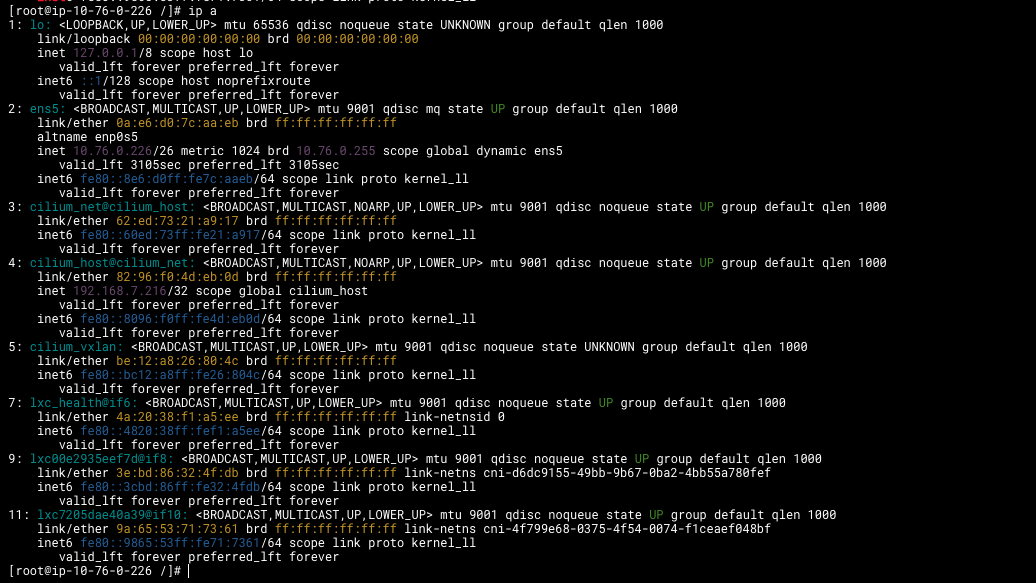
| index(無權重 | 介面名稱 | 說明 | 建立階段(對應流程) |
|---|---|---|---|
| 1 | lo | 回環介面 | 系統預設 |
| 2 | ens5 | 實體網卡,節點對外通訊用 | 系統預設 |
| 3 | cilium_net | VXLAN overlay 隧道口 | Agent 初始化時建立(步驟 E) |
| 4 | cilium_host | Node 的虛擬 bridge | Agent 初始化時建立(步驟 E) |
| 5 | cilium_vxlan | 封裝 VXLAN 封包的裝置 | Agent 初始化時建立(步驟 E) |
| 7 | lxc_health16 | Cilium Health Endpoint 對應 veth | Health probe DaemonSet 啟動(步驟 F) |
| 9–11 | lxc* | Pod 的 veth pair(host side) | CNI ADD 請求建立(步驟 F) |
5. 那 Cilium operator 在幹嘛?
- Cluster Pool IPAM 管理者
- 為整個集群的每個 Node 配置對應的 Pod CIDR
- 當你使用
ipam: cluster-pool時:cilium-operator從你設定的 IP 範圍中切分出小段 CIDR 分配給每個 Nodecilium-agent再從這些段中挑選單一 IP 給 Pod
- 管理 Node、Endpoint、Service 的 CRD 與同步狀態
- 與 Kubernetes API Server 互動,建立、更新以下 Cilium 專屬 CRD:
CiliumNode: 為每個 Node 建立對應狀態與分配資訊CiliumEndpointSlice: 支援高效 endpoint 查詢(像是 kube-proxy 的 EndpointSlice)
- 與 Kubernetes API Server 互動,建立、更新以下 Cilium 專屬 CRD:
- Kubernetes 資源與 Cilium BPF 狀態的同步橋梁
- 同步 K8s 的 Node label, annotations, taints, 甚至 Node deletion 到 Cilium 狀態
- 負責幫忙 Garbage Collection,例如某個 Pod 已經刪除,對應的 CiliumEndpoint 也要清掉
- 自動建立與管理 Node-to-Node 路由(如果 direct routing 模式)
- 在你用 VXLAN 的情況下這功能不會啟用
- 但如果未來切換到
tunnel=disabled+ipam=cluster-pool,Operator 就會幫你處理 BGP route distribution(搭配 MetalLB or BGP Control Plane)
- 處理 CiliumClusterwideNetworkPolicy(CCNP)相關邏輯
- 如果使用了 cluster-wide 的 policy 物件,operator 會處理這些規則的控制面邏輯。
Debug 過程紀錄
部署與整合 AWS EKS、Cilium、Karpenter、EBS CSI Driver 過程中遇到的實戰問題與解法
1. Cilium overlay VXLAN 不通
-
現象
-
cilium-health status顯示所有其他節點的 endpoint timeoutCluster health: 1/12 reachable (2025-04-19T09:41:11Z) Name IP Node Endpoints ip-10-76-0-101 (localhost) 10.76.0.101 1/1 1/1 ip-10-76-0-107 10.76.0.107 0/1 0/1 ip-10-76-0-112 10.76.0.112 0/1 0/1 -
tcpdump顯示只有節點自己發出的封包,沒有接收到任何 VXLAN 封包(UDP 8472)$ tcpdump -ni ens5 udp port 8472 # 只有 out bound packet 沒有 inbound IP ip-10-76-0-226 > ip-10-76-0-244.otv: OTV, flags [I] (0x08), overlay 0, instance 6 IP ip-192-168-7-216 > ip-192-168-3-215: ICMP echo request, id 20614, seq 0, length 32 IP ip-10-76-0-226 > ip-10-76-0-244.otv: OTV, flags [I] (0x08), overlay 0, instance 6 IP ip-192-168-7-216> ip-192-168-3-215: ICMP echo request, id 20614, seq 1, length 32 IP ip-10-76-0-226 > ip-10-76-0-244.otv: OTV, flags [I] (0x08), overlay 0, instance 6 IP ip-192-168-7-216 > ip-192-168-3-215: ICMP echo request, id 20614, seq 2, length 32 IP ip-10-76-0-226 > ip-10-76-0-244.otv: OTV, flags [I] (0x08), overlay 0, instance 6Flow Logs 紀錄,UDP 8472 rejected
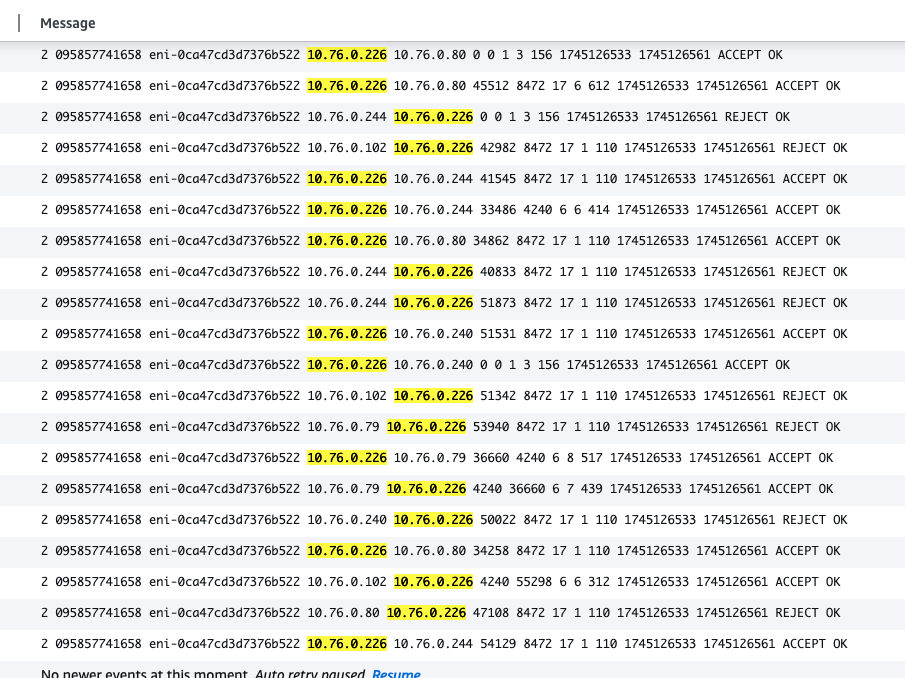
在 tcpdump 的階段這些封包不應該被標記為 OTV,但後續實作不影響
- 有個瘋子拿 gateway load balancer 解掉他了:[EKS: Cilium as the only CNI driver with simplified hybrid nodes and admission webhooks routing](https://medium.com/@the.jfnadeau/eks-cilium-as-the-only-cni-driver-with-simplified-hybrid-nodes-and-admission-webhooks-routing-1f351d11f9dd) -
-
原因:Security Group 未開放 UDP 8472 ingress (VXLAN)
-
解法於
-nodeSecurity Group 新增一條 inbound rule:- Type: Custom UDP
- Port: 8472
- Source: Self (SG 自引用)
2. Karpenter node 無 /etc/cni/net.d/05-cilium.conflist
- 現象:Karpenter 開啟來的節點沒有辨別 cni 用的檔案,也沒有跑 cilium pod
- 原因
- 未加上
node.cilium.io/agent-not-ready=true:NoSchedulestartup taint - cilium 有 affinity 限制僅跑在特定 node group
- 未加上
- 解法
-
Karpenter NodePool 加入
startupTaints:如果加在 taints 的話,Karpenter 會因為 cilium not ready 而誤判所有 pod 都無法 schedule,導致無法順利開啟新的 node
startupTaints: - key: node.cilium.io/agent-not-ready value: "true" effect: NoSchedule -
新增 affinity 限制
affinity:
  nodeAffinity:
    requiredDuringSchedulingIgnoredDuringExecution:
      nodeSelectorTerms:
        - matchExpressions:
            - key: eks.amazonaws.com/nodegroup
              operator: Exists
        - matchExpressions:
            - key: karpenter.sh/registered
              operator: Exists
-
3. CoreDNS Error: Pod Respond timeout (Pod → VPC DNS / RDS / S3)
-
問題說明:CoreDNS pod 無法正確被開啟,log 顯示
HINFO: read udp 192.168.17.223:40853 → 10.76.0.2:53: i/o timeout-
我有一個 pod ip
192.168.17.223想要查 DNS,對 VPC DNS server(10.76.0.2:53)送封包 -
沒有做 masquerade 的情境下,封包會長這樣:
From: 192.168.17.223:40853 # 有用 masquerade 會使用 node ip: 10.76.0.102:40853 To: 10.76.0.2:53 -
封包會進入 VPC,但
10.76.0.2要回封時,找不到192.168.17.223是誰,因此 timeout
-
-
原因
-
Cilium 沒正確設置 NAT masquerade 設定:overlay pod 對 VPC 出去沒做 SNAT,導致回應封包找不到路
-
iptables -t nat無任何MASQUERADE規則[root@ip-10-76-0-102 /]# sudo iptables -t nat -L -n | grep CILIUM CILIUM_PRE_nat all -- 0.0.0.0/0 0.0.0.0/0 /* cilium-feeder: CILIUM_PRE_nat */ CILIUM_OUTPUT_nat all -- 0.0.0.0/0 0.0.0.0/0 /* cilium-feeder: CILIUM_OUTPUT_nat */ CILIUM_POST_nat all -- 0.0.0.0/0 0.0.0.0/0 /* cilium-feeder: CILIUM_POST_nat */ Chain CILIUM_OUTPUT_nat (1 references) Chain CILIUM_POST_nat (1 references) Chain CILIUM_PRE_nat (1 references)
-
-
解法
-
開啟
bpf.masquerade: true- 不可同時設定
egressMasqueradeInterfaces,BPF 會主動去查這台節點用哪個 interface(eth0orens+) - BPF SNAT 取代 iptables 實作,效能更好
- 不可同時設定
-
開啟後 node 的行為
項目 傳統 iptables SNAT BPF masquerading(啟用後) SNAT 行為在哪實作? iptables -t nat中的MASQUERADE規則由 Cilium 的 eBPF 程式直接執行 SNAT 日誌在哪看? iptables-save/iptables -t nat -Lcilium monitor/ Hubble FlowDebug 工具 tcpdump+iptablescilium monitor,cilium bpf封包 SNAT 前後狀態 明顯可在 iptables trace 隱藏在 eBPF 封包處理過程中
-
4. ExternalSecret 沒辦法被建立
- 現象:Apply ExternalSecret CRD 時遇到 “Address not allowed” 的問題
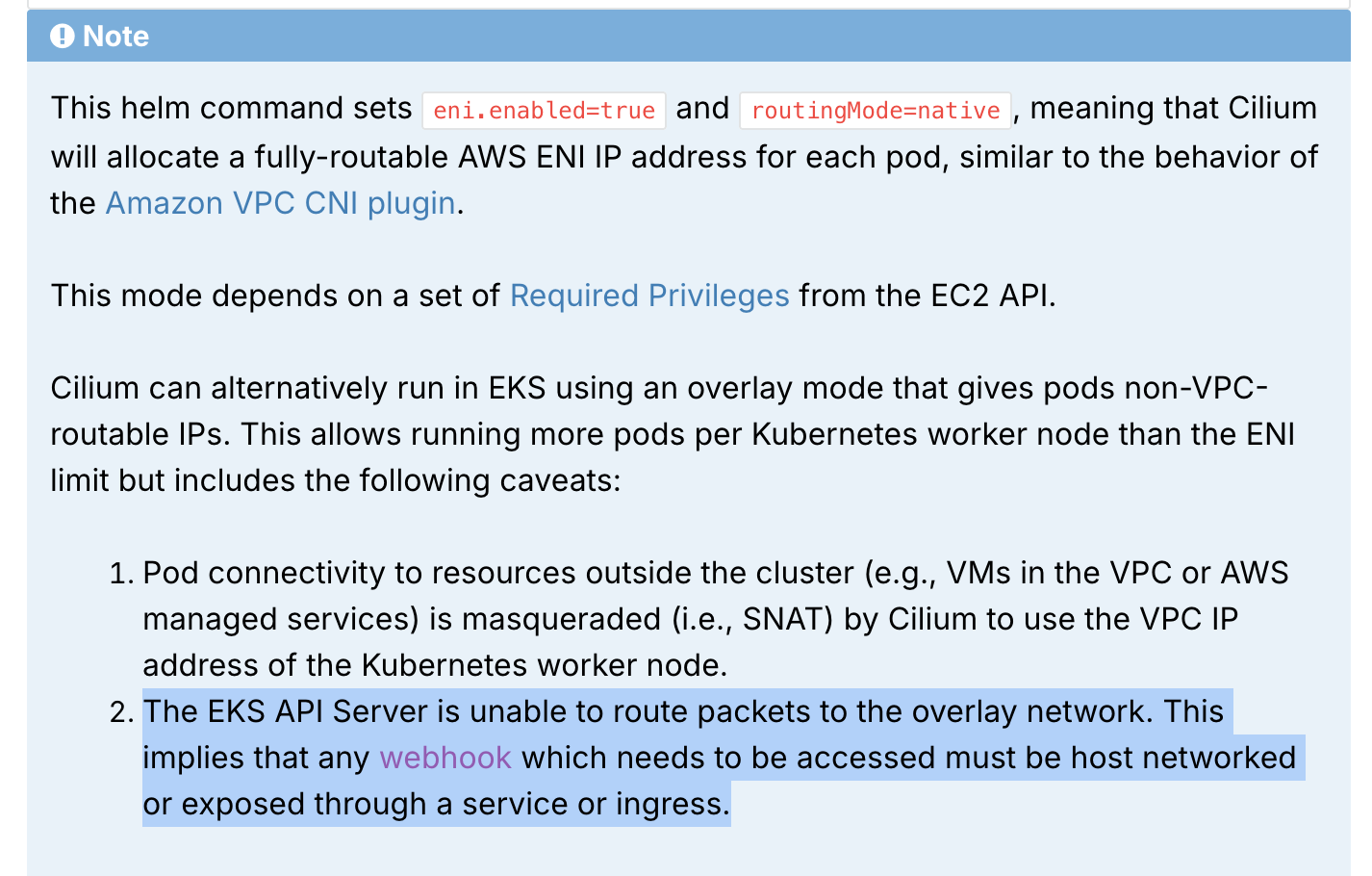
- 原因:EKS api-server 無法與 overlay IP 直接傳輸
- 解法:將需要被 api-server 戳的 webhook 設定
hostNetwork: true,讓該 webhook 使用 VPC IP - Reference: Installation using Helm — Cilium 1.17.3 documentation
5. Prometheus PVC provisioning 失敗
-
現象
- ebs-csi-node pod & PVC
Pending - ebs-csi-node 錯誤訊息:
Retrieving IMDS metadata failed, falling back to Kubernetes metadata" err="could not get EC2 instance identity metadata: operation error ec2imds: GetInstanceIdentityDocument, request canceled, context deadline exceeded"
- ebs-csi-node pod & PVC
-
原因:driver container 無法存取 IMDS metadata 或 K8s API server
-
解法:patch EBS CSI DaemonSet 加上 hostNetwork 設定為
truekubectl patch daemonset ebs-csi-node -n kube-system \ --type=json \ -p='[{"op": "add", "path": "/spec/template/spec/hostNetwork", "value": true}]'
6. Webhook 與 overlay 的限制
-
問題說明
- Overlay 模式下 pod 使用非 VPC routable IP,EKS API Server 無法直接路由至 pod
-
原因說明:Webhook 是「API Server 主動連 pod」的請求流程
- 這與 pod → 外部不同,masquerading(SNAT)無法套用於「入站請求」
- Control Plane 只認得 VPC routable 的 ENI IP,無法 route 到 overlay pod IP
- 若 webhook 是 overlay pod,API Server 請求會 timeout,出現
connection refused / address not allowed
-
關鍵觀察
- 多數 Helm Chart 在部署 webhook 服務時,會同時註冊 CRD 以及安裝 Webhook controller
- 在註冊 CRD 的過程中,Kubernetes API Server 會立即觸發 webhook 校驗
- ✅ 有 CRD + webhook 的服務:需要
hostNetwork: true - ❌ 純 workload webhook(不在 CRD 註冊時即啟動):可不加 hostNetwork,只需透過 service proxy 即可
- ✅ 有 CRD + webhook 的服務:需要
-
解法:將「需要被 API Server 即時觸發的 webhook pod」加上
hostNetwork: true -
補充建議
類型 建議 原因 External Secrets webhook ✅ hostNetwork: trueAPI Server 安裝 CRD 時會即刻觸發 webhook cert-manager webhook ✅ or use Ingress 同上 CSI Daemon ✅ 要用到 IMDS,hostNetwork 才能 reach metadata endpoint workload webhook ❌ 可透過 ClusterIP,不受 API Server 觸發時限制
7. Overlay 通訊 vs 出網 SNAT vs 控制平面流量 整體整理
| 類型 | 舉例 | 是否需要 SNAT | 是否需 hostNetwork | 解釋 |
|---|---|---|---|---|
| Pod → Pod (overlay) | n8n → PostgreSQL | ❌ | ❌ | overlay tunnel 處理,不經 VPC route |
| Pod → VPC DNS / RDS / S3 | CoreDNS → 10.76.0.2 | ✅ | ❌ | SNAT 可轉換 IP 避免回覆失敗 |
| Pod → Internet | curl github.com | ✅ | ❌ | 同上,SNAT 後出網 |
| API Server → webhook | CRD → webhook | ❌(SNAT 無效) | ✅ | 為入站,僅能打 node IP |
| Ingress → Pod | 使用 ALB/NLB | ❌ | ❌ | ingress controller 已處理 routing 與 proxy |
8. Cilium 到底能不能用
-
為什麼 api-server 沒辦法碰到 overlay ips
- Control Plane 位於非 cluster 的節點中,無法參與 eBPF 所做的 SNAT 邏輯
- 它只能打到 VPC routable 的 IP(即:ENI 上的 Node IP,或 Service 的 ClusterIP ➝ NodePort ➝ Pod)
- 如果 Webhook pod 是 overlay IP → Service 解析後最終找不到可 route 的後端 Pod IP (192.168.x.x)
所以這種情況下,masquerade 完全沒用,因為:
✅ masquerade 只能讓 pod ➝ 外部服務成功,
❌ 不能讓外部服務 ➝ pod 成功(它不是出站)
- api-server 直接打 pods 除了 hostNetwork 以外還有什麼解法
- expose with Load Balancer service or ingress
-
還有哪些其他服務有可能會需要用到 hostNetwork?
-
Webhook
- 建立 ExternalSecret CRD 時,api-server 會需要直接打 request 到 External Secret Webhook (Admission Webhook) pod 上
- Admission Webhook 在幹嘛?
- Mutating Webhook:可以修改 Resource 內容後再送出(像是新增 label 等)
- Validating Webhook:判斷是否允許操作(例如 external secret webhook 就是在檢查現在新增的 external secret 是否合法)
- 會建立這兩種 resource (kind: Mutating/Validating Webhook Config) 的 helm chart 都需要 api-server 直接向 pod 發出 request
-
Aggregated API Server
-
自定義的 k8s api server (as pod),可以做為 control plane api-server 的擴充
-
與 CRD 的差異
項目 CRD(CustomResourceDefinition) Aggregated API Server 擴充方式 直接在 API Server 宣告 schema 加掛新的 API Server(像 microservice) 部署方式 用 apiextensions.k8s.io/v1建立 YAML寫一個 HTTP API + 啟動 Pod 儲存資料 資料儲存在 etcd 中 你可以自選存儲(etcd、DB、Redis…) API Server proxy ❌ 不需 proxy(API Server 原生支援) ✅ API Server 將 request proxy 到外部服務 彈性 / 自由度 🟡 中等(需遵循 CRD 格式) 🟢 高(可自由定義 API 行為與存儲) 延伸功能 比較像 schema extension 比較像 plugin server(如 metrics、volumes) -
會建立 kind: APIService 的 helm chart 需要 api-server 直接向 pod 發出 request
kubectl exec / logs / port-forward -
-
Kubernetes API Server 是直接向對應 Node 上的
kubelet發 request
[你] ──kubectl exec──▶ [API Server] │ ▼ [kubelet on Pod's Node] ──(本地 veth/vxlan)──▶ [Pod]- 為什麼有些 pods 在 overlay ips 下可以開
kubectl exec,有些不行?- 因為有些 pods 沒有安裝 interactive shell
-
當「Kubernetes cluster 外部的東西」需要主動向 Pod 發送請求,而且不能透過 Kubernetes 的 Service(或其他 Proxy)層轉發時,才會需要考慮讓該 Pod 使用 hostNetwork。
9. 有哪些服務需要 cluster 以外的東西向 pod 送請求,且不能透過 service 存取
| 服務 | Admission Controller | Aggregation Layer | 外部連線需求 |
|---|---|---|---|
| SonarQube | |||
| GitLab Runner | |||
| external-dns | |||
| Argocd | |||
| karpenter | |||
| ebs-csi-driver | v | ||
| external-secret | v | ||
| load balancer controller | v | ||
| prometheus | v | ||
| ingress-nginx | v | ||
| n8n | v | ||
| keda | v | v |